Refreshing non production environment is a routine work for almost all DBAs.
Below are the standard cloning process steps.
Database Clone :
Pre-requisite on source database side :
- Run adpreclone.pl on database side and create zip of DB Oracle home.
[oracle@test ~]$ . CDBTEST_test.env
[oracle@test ~]$ cd $ORACLE_HOME/appsutil/scripts/TEST_test
[oracle@test TEST_test]$ adpreclone.pl dbTier
[oracle@test TEST_test]$ cd $ORACLE_HOME
[oracle@test TEST_test]$ nohup tar -czvf 19.0.0_PROD.tgz 19.0.0 & --Executing command with nohup, will run the task in background.- Run RMAN backup command to take the database backup.
run {
 allocate channel c1 type disk;
 allocate channel c2 type disk;
 allocate channel c3 type disk;
 BACKUP as compressed backupset FULL FILESPERSET 10 FORMAT '/backup/TEST_D_%s_%p_%t.bak' DATABASE;
 BACKUP as compressed backupset filesperset 10 FORMAT '/backup/TEST_A_%s_%p_%t.bak' ARCHIVELOG ALL skip inaccessible;
 BACKUP FORMAT '/backup/TEST_C_%s_%p_%t.bak' CURRENT CONTROLFILE;
 RELEASE CHANNEL c1;
 RELEASE CHANNEL c2;
 RELEASE CHANNEL c3;
}Note : You can allocate channels according to your environment. Higher channels can cause performance issues.
- Take backup of spfile.
$ sqlplus / as sysdba
SQL*Plus: Release 19.0.0.0.0 - Production on Tue Sep 8 14:38:52 2026
Version 19.32.0.0.0
Copyright (c) 1982, 2026, Oracle.  All rights reserved.
Connected to:
Oracle Database 19c Enterprise Edition Release 19.0.0.0.0 - Production
Version 19.32.0.0.0
SQL> create pfile='/home/oracle/pfile_PROD.txt' from spfile;
File created.- Transfer all the backups to your target server.
- RMAN Backup
- Oracle home backup
- PFILE
Steps to be performed on Target database side :
DB Directory : /u01/app/oracle/db/19.0.0 — I created this directory for my database home.
ORA Inventory : /u01/app/oraInventory
1. Take backup of ORA Inventory location and recreate them.
Check location of oraInventory from /etc/oraInst.loc file.
[oracle@test ~]$ cat /etc/oraInst.loc
inventory_loc=/u01/app/oraInventory
inst_group=oinstallTake backup of oraInventory and recreate oraInventory directory.
[oracle@test ~]$ cd /u01/app
[oracle@test app]$
[oracle@test app]$ mv oraInventory oraInventory.bkp
[oracle@test app]$ mkdir oraInventory2. Move your backup to /u01/app/oracle/db directory and untar it.
[oracle@test db]$ nohup tar -xzvf 19.0.0_PROD.tgz & --Executing command with nohup, will run the task in background.3. Run adcfgclone on database side.
[oracle@test ~]$ cd /u01/app/oracle/db/19.0.0/appsutil/clone/bin
[oracle@test bin]$ perl adcfgclone.pl dbTechStack
Copyright (c) 2002, 2015 Oracle Corporation
                        Redwood Shores, California, USA
                        Oracle E-Business Suite Rapid Clone
                                 Version 12.2
                      adcfgclone Version 120.63.12020000.83
Enter the APPS password :
Running: Context clone...
Log file located at /u01/app/oracle/db/19.0.0/appsutil/clone/bin/CloneContext_0819180451.log
Provide the values required for creation of the new Database Context file.
Target System Hostname (virtual or normal) [test] : test.example.com
Target System Base Directory : /u01/app/oracle/db
Target Instance is RAC (y/n) [n] : n
Target System CDB Name : CDBTEST
Target System PDB Name : TEST
Role separation is supported y/n [n] ? : Enter
Number of DATA_TOP's on the Target System [2] : 1
Target System DATA_TOP Directory 1 : /u01/app/oracle/db/oradata
Specify value for OSBACKUPDBA group [oinstall] :
Specify value for OSDGDBA group [oinstall] :
Specify value for OSKMDBA group [oinstall] :
Specify value for OSRACDBA group [oinstall] :
Target System RDBMS ORACLE_HOME Directory [/u01/app/oracle/db/19.0.0] :
Do you want to preserve the Display [apps:0.0] (y/n)  : n
Target System Display [test:0.0] :
Do you want the target system to have the same port values as the source system (y/n) [y] ? : n
Target System Port Pool [0-99] : 0
Checking the port pool 0
done: Port Pool 0 is free
Report file located at /u01/app/oracle/db/19.0.0/appsutil/temp/portpool.lst
The new database context file has been created :
  /u01/app/oracle/db/19.0.0/appsutil/TEST_test.xml
Check Clone Context logfile /u01/app/oracle/db/19.0.0/appsutil/clone/bin/CloneContext_0819180451.log for details.
Running Rapid Clone with command:
Running:
perl /u01/app/oracle/db/19.0.0/appsutil/clone/bin/adclone.pl java=/u01/app/oracle/db/19.0.0/appsutil/clone/bin/../jre mode=apply stage=/u01/app/oracle/db/19.0.0/appsutil/clone component=dbTechStack method=CUSTOM dbctxtg=/u01/app/oracle/db/19.0.0/appsutil/TEST_test.xml showProgress contextValidated=true
Beginning rdbms home Apply - Wed Aug 19 18:08:16 2026
/u01/app/oracle/db/19.0.0/appsutil/clone/bin/../jre/bin/java -Xmx600M -Doracle.jdbc.autoCommitSpecCompliant=false -Doracle.jdbc.DateZeroTime=true -Doracle.jdbc.DateZeroTimeExtra=true -DCONTEXT_VALIDATED=true -Doracle.installer.oui_loc=/u01/app/oracle/db/19.0.0/oui -classpath /u01/app/oracle/db/19.0.0/appsutil/clone/jlib/xmlparserv2.jar:/u01/app/oracle/db/19.0.0/appsutil/clone/jlib/ojdbc8.jar::/u01/app/oracle/db/19.0.0/appsutil/clone/jlib/java:/u01/app/oracle/db/19.0.0/appsutil/clone/../../jlib/orai18n.jar:/u01/app/oracle/db/19.0.0/appsutil/clone/jlib/oui/OraInstaller.jar:/u01/app/oracle/db/19.0.0/appsutil/clone/jlib/oui/ewt3.jar:/u01/app/oracle/db/19.0.0/appsutil/clone/jlib/oui/share.jar:/u01/app/oracle/db/19.0.0/appsutil/clone/jlib/oui/srvm.jar:/u01/app/oracle/db/19.0.0/appsutil/clone/jlib/ojmisc.jar   oracle.apps.ad.clone.ApplyDBTechStack -e /u01/app/oracle/db/19.0.0/appsutil/TEST_test.xml -stage /u01/app/oracle/db/19.0.0/appsutil/clone   -showProgress
APPS Password : Log file located at /u01/app/oracle/db/19.0.0/appsutil/log/TEST_test/ApplyDBTechStack_08191808.log
  \      0% completed
  \      0% completed
Completed Apply...
Wed Aug 19 18:12:11 2026
Running:
/u01/app/oracle/db/19.0.0/bin/sqlplus -s /nolog @/u01/app/oracle/db/19.0.0/appsutil/clone/bin/sqlCmd.sql > /u01/app/oracle/db/19.0.0/appsutil/clone/bin/get_ad_codelevel.log 2>&1
Running ETCC to check status of DB technology patches...
Version of /u01/app/oracle/db/19.0.0/appsutil/etcc/checkDBpatch.sh is 120.105
Running:
/u01/app/oracle/db/19.0.0/bin/sqlplus -s /nolog @/u01/app/oracle/db/19.0.0/appsutil/clone/bin/sqlCmd.sql > /u01/app/oracle/db/19.0.0/appsutil/clone/bin/get_ad_codelevel.log 2>&1
 +===============================================================+
 |    Copyright (c) 2005, 2022 Oracle and/or its affiliates.     |
 |                     All rights reserved.                      |
 |             Oracle E-Business Suite Release 12.2              |
 |          Database EBS Technology Codelevel Checker            |
 +===============================================================+
Validating context file: /u01/app/oracle/db/19.0.0/appsutil/TEST_test.xml
Using context file from command line argument:
/u01/app/oracle/db/19.0.0/appsutil/TEST_test.xml
Starting Database EBS Technology Codelevel Checker, Version 120.105
Wed Aug 19 18:12:11 IST 2026
Log file for this session : /u01/app/oracle/db/19.0.0/appsutil/clone/bin/log/checkDBpatch_18800.log
Identifying database release.
Database release set to 19.18.0.0.
Multitenant identified.
 - Container database (CDB) identified via s_cdb_name is CDBTEST
 - Pluggable database (PDB) identified via s_pdb_name is TEST
Connecting to database.
+-----------------------------------------------------------------------------+
[WARNING] DB-ETCC: Could not connect to database, so unable to check:
  - Whether database is in READ-WRITE mode.
  - Existence of table needed to store DB-ETCC results.
  - Enablement of database In-Memory option.
    If this feature is enabled, additional fixes need to be verified.
Resolve the database connectivity issue, and then rerun DB-ETCC.
+-----------------------------------------------------------------------------+
Bugfix file /u01/app/oracle/db/19.0.0/appsutil/etcc/db/onprem/txk_R1220_DB_base_bugs.xml : 120.0.12020000.71
This file will be used for identifying missing bugfixes.
Mapping file /u01/app/oracle/db/19.0.0/appsutil/etcc/db/onprem/txk_R1220_DB_mappings.xml : 120.0.12020000.47
This file will be used for mapping bugfixes to patches.
[WARNING] DB-ETCC: Bugfix XML file (/u01/app/oracle/db/19.0.0/appsutil/etcc/db/onprem/txk_R1220_DB_base_bugs.xml) is more than 90 days old.
+-----------------------------------------------------------------------------+
   Always use the latest version of ETCC available in patch 17537119, as new
   bugfixes will not be checked by older versions of the utility.
+-----------------------------------------------------------------------------+
Checking Bugfix XML file for 19.18.0.0_RU
Obtained list of bugfixes to be applied and the list to be rolled back.
Now checking Database ORACLE_HOME.
The opatch utility is version 12.2.0.1.36.
DB-ETCC is compatible with this opatch version.
Found patch records in the inventory.
Checking Mapping XML file for 19.18.0.0.230117DBRU
All the required one-off bugfixes are present in Database ORACLE_HOME.
[WARNING] Database not available. DB-ETCC results cannot be stored.
Finished checking fixes for Oracle Database: Wed Aug 19 18:12:28 IST 2026

Log file for this session: /u01/app/oracle/db/19.0.0/appsutil/clone/bin/log/checkDBpatch_18800.log4. Create Listener.ora and tnsnames.ora file.
- Start new session and set below environment.
export ORACLE_HOME=/u01/app/oracle/db/19.0.0
export PATH=$ORACLE_HOME/perl/bin:$ORACLE_HOME/bin:$PATH
export LD_LIBRARY_PATH=$ORACLE_HOME:$ORACLE_HOME/lib
export PERL5LIB=$ORACLE_HOME/perl/lib/5.28.1:$ORACLE_HOME/perl/site_perl/5.28.1:$ORACLE_HOME/appsutil/perl
export PATH=$ORACLE_HOME/perl:$ORACLE_HOME/perl/lib:$ORACLE_HOME/perl/bin:$PATH- Change permission for txkSetCfgCDB.env and load the script.
[oracle@test ~]$ cd /u01/app/oracle/db/19.0.0/appsutil
[oracle@test appsutil]$ chmod 755 txkSetCfgCDB.env

[oracle@test appsutil]$ ./txkSetCfgCDB.env dboraclehome=/u01/app/oracle/db/19.0.0

Oracle Home being passed: /u01/app/oracle/db/19.0.0- Execute txkGenCDBTnsAdmin.pl to generate listener.ora and tnsnames.ora.
[oracle@test bin]$ cd /u01/app/oracle/db/19.0.0/appsutil/bin
[oracle@test bin]$ perl txkGenCDBTnsAdmin.pl -dboraclehome=/u01/app/oracle/db/19.0.0 -cdbname=CDBTEST -cdbsid=CDBTEST -dbport=1521 -outdir=/u01/app/oracle/db/19.0.0/appsutil/log -israc=no

		Script Name    : txkGenCDBTnsAdmin.pl
		Script Version : 120.0.12020000.11
		Started        : Wed Aug 19 18:22:19 IST 2026

		Log File       : /u01/app/oracle/db/19.0.0/appsutil/log/TXK_CDB_TNS_ADMIN_Wed_Aug_19_18_22_19_2026/txkGenCDBTnsAdmin.log

		-----------
		Values used
		-----------
		Database Oracle Home    : /u01/app/oracle/db/19.0.0
		CDB NAME                : CDBTEST
		CDB SID                 : CDBTEST
		Database port           : 1521
		OUT Directory           : /u01/app/oracle/db/19.0.0/appsutil/log
		Is RAC?                 : no
		Virtual Hostname        :
		Logical Hostname        :
		Script execution mode   : generate

		=========================
		Validating oracle home...
		=========================
		Oracle Home: /u01/app/oracle/db/19.0.0 exists.


		===========================
		Validating out directory...
		===========================
		Out directory: /u01/app/oracle/db/19.0.0/appsutil/log exists.


		===================================
		Validating script execution mode...
		===================================


		Script execution mode: generate
		Script execution mode is valid.


		============================
		Inside getDBHostDetails()...
		============================
		DB Hostname : test
		DB Domain   : example.com
		Logical hostname is not passed, hence using physical hostname details.
		Logical Hostname : test
		Logical Domain   : example.com


		=====================
		Inside getDBPort()...
		=====================
		DB Port passed as an argument, using the same.
		DB Port: 1521


		======================================
		Inside generateCDBTNSAdminContent()...
		======================================
		Creating the directory: /u01/app/oracle/db/19.0.0/appsutil/log/TXK_CDB_TNS_ADMIN_Wed_Aug_19_18_22_19_2026/tns_admin_cdb_bkp
		Creating the directory: /u01/app/oracle/db/19.0.0/appsutil/log/TXK_CDB_TNS_ADMIN_Wed_Aug_19_18_22_19_2026/tns_admin_cdb_temp
		listener_template: listener_ora_cdb_db19.tmp
		sqlnet_template: sqlnet_ora_cdb_db19.tmp


		Copying the file
		----------------
		SOURCE : /u01/app/oracle/db/19.0.0/appsutil/template/listener_ora_cdb_db19.tmp
		TARGET : /u01/app/oracle/db/19.0.0/appsutil/log/TXK_CDB_TNS_ADMIN_Wed_Aug_19_18_22_19_2026/tns_admin_cdb_temp/listener.ora


		===================================
		Inside replaceContextVariables()...
		===================================
		Copying the file
		----------------
		SOURCE : /u01/app/oracle/db/19.0.0/network/admin/listener.ora
		TARGET : /u01/app/oracle/db/19.0.0/appsutil/log/TXK_CDB_TNS_ADMIN_Wed_Aug_19_18_22_19_2026/tns_admin_cdb_bkp/listener.ora


		Copying the file
		----------------
		SOURCE : /u01/app/oracle/db/19.0.0/appsutil/log/TXK_CDB_TNS_ADMIN_Wed_Aug_19_18_22_19_2026/tns_admin_cdb_temp/listener.ora
		TARGET : /u01/app/oracle/db/19.0.0/network/admin/listener.ora


		Copying the file
		----------------
		SOURCE : /u01/app/oracle/db/19.0.0/appsutil/template/tnsnames_ora_cdb_db121.tmp
		TARGET : /u01/app/oracle/db/19.0.0/appsutil/log/TXK_CDB_TNS_ADMIN_Wed_Aug_19_18_22_19_2026/tns_admin_cdb_temp/tnsnames.ora


		===================================
		Inside replaceContextVariables()...
		===================================
		Copying the file
		----------------
		SOURCE : /u01/app/oracle/db/19.0.0/network/admin/tnsnames.ora
		TARGET : /u01/app/oracle/db/19.0.0/appsutil/log/TXK_CDB_TNS_ADMIN_Wed_Aug_19_18_22_19_2026/tns_admin_cdb_bkp/tnsnames.ora


		Copying the file
		----------------
		SOURCE : /u01/app/oracle/db/19.0.0/appsutil/log/TXK_CDB_TNS_ADMIN_Wed_Aug_19_18_22_19_2026/tns_admin_cdb_temp/tnsnames.ora
		TARGET : /u01/app/oracle/db/19.0.0/network/admin/tnsnames.ora


		Copying the file
		----------------
		SOURCE : /u01/app/oracle/db/19.0.0/appsutil/template/sqlnet_ora_cdb_db19.tmp
		TARGET : /u01/app/oracle/db/19.0.0/appsutil/log/TXK_CDB_TNS_ADMIN_Wed_Aug_19_18_22_19_2026/tns_admin_cdb_temp/sqlnet.ora


		===================================
		Inside replaceContextVariables()...
		===================================
		Copying the file
		----------------
		SOURCE : /u01/app/oracle/db/19.0.0/network/admin/sqlnet.ora
		TARGET : /u01/app/oracle/db/19.0.0/appsutil/log/TXK_CDB_TNS_ADMIN_Wed_Aug_19_18_22_19_2026/tns_admin_cdb_bkp/sqlnet.ora


		Copying the file
		----------------
		SOURCE : /u01/app/oracle/db/19.0.0/appsutil/log/TXK_CDB_TNS_ADMIN_Wed_Aug_19_18_22_19_2026/tns_admin_cdb_temp/sqlnet.ora
		TARGET : /u01/app/oracle/db/19.0.0/network/admin/sqlnet.ora


		==============================
		Inside updateCDBSqlNetOra()...
		==============================
		Updating the IFILE entry...


		Exiting from the script.
		Ended: Wed Aug 19 18:22:19 IST 2026

[oracle@test bin]$5. Start Listener.
		[oracle@test TEST_test]$ cd /u01/app/oracle/db/19.0.0/appsutil/scripts/TEST_test

		[oracle@test TEST_test]$ ./adcdblnctl.sh start CDBTEST
		Logfile: /u01/app/oracle/db/19.0.0/appsutil/log/TEST_test/adcdblnctl.txt

		You are running adcdblnctl.sh version 120.0.12020000.4

		Starting listener process CDBTEST ...

		LSNRCTL for Linux: Version 19.0.0.0.0 - Production on 19-AUG-2026 18:26:58

		Copyright (c) 1991, 2022, Oracle.  All rights reserved.

		Starting /u01/app/oracle/db/19.0.0/bin/tnslsnr: please wait...

		TNSLSNR for Linux: Version 19.0.0.0.0 - Production
		System parameter file is /u01/app/oracle/db/19.0.0/network/admin/listener.ora
		Log messages written to /u01/app/oracle/db/19.0.0/log/diag/tnslsnr/test/cdbtest/alert/log.xml
		Listening on: (DESCRIPTION=(ADDRESS=(PROTOCOL=tcp)(HOST=test.example.com)(PORT=1521)))

		Connecting to (DESCRIPTION=(ADDRESS=(PROTOCOL=TCP)(HOST=test.example.com)(PORT=1521)))
		STATUS of the LISTENER
		------------------------
		Alias                     CDBTEST
		Version                   TNSLSNR for Linux: Version 19.0.0.0.0 - Production
		Start Date                19-AUG-2026 18:26:59
		Uptime                    0 days 0 hr. 0 min. 40 sec
		Trace Level               off
		Security                  ON: Local OS Authentication
		SNMP                      OFF
		Listener Parameter File   /u01/app/oracle/db/19.0.0/network/admin/listener.ora
		Listener Log File         /u01/app/oracle/db/19.0.0/log/diag/tnslsnr/test/cdbtest/alert/log.xml
		Listening Endpoints Summary...
		  (DESCRIPTION=(ADDRESS=(PROTOCOL=tcp)(HOST=test.example.com)(PORT=1521)))
		The listener supports no services
		The command completed successfully
		Waiting for service TEST to be available...
		Waiting for service TEST to be available...
		Waiting for service TEST to be available...
		Waiting for service TEST to be available...
		Waiting for service TEST to be available...
^CNote: If the source Oracle EBusiness Suite instance is at the R12.TXK.C.DELTA.12 codelevel, the above commands may exit with status 1, waiting for the PDB service to start. This error can be ignored as the database is not yet restored.
6. Make below change in PFILE which you have copies from source side.
- Change db name from source to target.
Open pfile in Vi editor
:%s/EBSCDB/TESTCDB/g
Append below parameters in PFILE. You may change second parameter according to your environment.
db_file_name_convert=(‘/u01/install/APPS/data’,’/u01/app/oracle/db/oradata’)
log_file_name_convert=(‘/u01/install/APPS/data’,’/u01/app/oracle/db/oradata’)
- make adump directory.
[oracle@test admin]$ mkdir -p /u01/app/oracle/db/19.0.0/admin/CDBTEST/adump7. Start database using PFILE and Start RMAN restore session.
- Source CDB environment and start database in nomount mode.
[oracle@test ~]$ sqlplus / as sysdba
SQL*Plus: Release 19.0.0.0.0 - Production on Wed Aug 19 19:00:36 2026
Version 19.18.0.0.0
Copyright (c) 1982, 2022, Oracle.  All rights reserved.
Connected to an idle instance.
SQL> startup nomount pfile='/home/oracle/pfile.txt'
ORA-32006: SEC_CASE_SENSITIVE_LOGON initialization parameter has been deprecated
ORACLE instance started.
Total System Global Area 2147482520 bytes
Fixed Size                  9165720 bytes
Variable Size            1090519040 bytes
Database Buffers         1023410176 bytes
Redo Buffers               24387584 bytes
SQL> exit- Start RMAN restore.
[oracle@test ~]$ rman auxiliary /
Recovery Manager: Release 19.0.0.0.0 - Production on Wed Aug 19 19:09:12 2026
Version 19.18.0.0.0
Copyright (c) 1982, 2019, Oracle and/or its affiliates.  All rights reserved.
connected to auxiliary database: CDBTEST (not mounted)
RMAN> run
{
   allocate auxiliary channel c1 device type disk;
   allocate auxiliary channel c2 device type disk;
   allocate auxiliary channel c3 device type disk;
   allocate auxiliary channel c4 device type disk;
   allocate auxiliary channel c5 device type disk;
   allocate auxiliary channel c6 device type disk;
   duplicate database to 'CDBTEST' backup location '/u01/app/backup/bkp' nofilenamecheck;
   release channel c1;
   release channel c2;
   release channel c3;
   release channel c4;
   release channel c5;
   release channel c6;
}2> 3> 4> 5> 6> 7> 8> 9> 10> 11> 12> 13> 14> 15> 16>
executing Memory Script
sql statement: alter pluggable database all open
Cannot remove created server parameter file
Finished Duplicate Db at 19-AUG-26
RMAN-00571: ===========================================================
RMAN-00569: =============== ERROR MESSAGE STACK FOLLOWS ===============
RMAN-00571: ===========================================================
RMAN-03002: failure of release command at 08/19/2026 19:52:59
RMAN-06012: channel: c1 not allocatedNote : RMAN is competed successfully but it may encounter error shown above.
8. Verify database and restart the database using spfile.
SQL> select name,open_mode from v$database;
NAME      OPEN_MODE
--------- --------------------
CDBTEST   READ WRITE
SQL> show pdbs
    CON_ID CON_NAME                       OPEN MODE  RESTRICTED
---------- ------------------------------ ---------- ----------
         2 PDB$SEED                       READ ONLY  NO
         3 EBSDB                          READ WRITE NO    -- This will show you source database name.

SQL> create spfile from pfile='/home/oracle/pfile.txt';
File created.
SQL> shut immediate;
SQL> startup9. Change PDB Name for Target database.
Verify if any service already exists with the Target PDB name, if exist, the same has to be removed.
- Run the following commands:
[oracle@test ~]$ . CDBTEST_test.env
[oracle@test ~]$ sqlplus / as sysdba
SQL> alter session set container=EBSDB;
Session altered.
SQL> show pdbs;

CON_ID CON_NAME                       OPEN MODE  RESTRICTED
---------- ------------------------------ ---------- ----------
     3 EBSDB                          MOUNTED
SQL> alter pluggable database EBSDB open;
Pluggable database altered.
SQL> select count(*) from cdb_services c, service$ s where upper(s.name) = upper('TEST') and s.deletion_date is null and s.name = c.name;
  COUNT(*)
----------
         0   -- No Service Exist. We can procees further.

Note : In above query, change database name "TEST" as per your target db name.Since no service exist, we can proceed further.
- In case, If you found any count in above query, it means the service exist and same has to be removed. You can execute below steps to remove service name.
export ORACLE_SID=<CDB SID>
$ sqlplus / as sysdba
SQL> alter session set container="<SOURCE PDB_NAME>";
SQL> dbms_service.delete_service('<TARGET PDB_NAME>');10. Rename PDB database.
Load Container database environment and run below commands.
[oracle@test ~]$ . CDBTEST_test.env
$ sqlplus / as sysdba
SQL> alter pluggable database "EBSDB" close;  -- <SOURCE PDB NAME>
Pluggable database altered.
SQL> alter pluggable database "EBSDB" unplug into '/home/oracle/EBSDB.xml';
Pluggable database altered.
SQL> drop pluggable database "EBSDB";
Pluggable database dropped.
SQL> create pluggable database "TEST" using '/home/oracle/EBSDB.xml' NOCOPY SERVICE_NAME_CONVERT=('ebs_EBSDB','ebs_TEST','EBSDB_ebs_patch','TEST_ebs_patch');
Pluggable database created.
SQL> alter pluggable database "TEST" open read write;
Pluggable database altered.
SQL> show pdbs;
    CON_ID CON_NAME                       OPEN MODE  RESTRICTED
---------- ------------------------------ ---------- ----------
         2 PDB$SEED                       READ ONLY  NO
         4 TEST                           READ WRITE NO
SQL> alter pluggable database all open;
Pluggable database altered.
SQL> alter pluggable database all save state instances=all;
Pluggable database altered.Till this step database cloning has been completed. Next we have to perform post cloning steps.
11. Post cloning steps for Database.
- Run the library update script against the Oracle database.
[oracle@test TEST_test]$ cd /u01/app/oracle/db/19.0.0/appsutil/install/TEST_test
[oracle@test TEST_test]$
[oracle@test TEST_test]$ sqlplus / as sysdba @adupdlib.sql so
sqlplus / as sysdba @adupdlib.sql <libext>
Where <libext> should be set to.
sl = For HP-UX
so = For Other Unix (Linux)
dll = For Windows.
SQL*Plus: Release 19.0.0.0.0 - Production on Fri Aug 21 12:52:57 2026
Version 19.18.0.0.0
Copyright (c) 1982, 2022, Oracle.  All rights reserved.
Connected to:
Oracle Database 19c Enterprise Edition Release 19.0.0.0.0 - Production
Version 19.18.0.0.0
PL/SQL procedure successfully completed.- Set the Target UTL_FILE_DIR Values in Oracle Database.
SQL> alter system reset db_domain scope=spfile;
System altered.
Restart Listener and database.
SQL> shut immediate;
Database closed.
Database dismounted.
ORACLE instance shut down.
SQL> exit
[oracle@test TEST_test]$ lsnrctl stop CDBTEST
[oracle@test TEST_test]$ lsnrctl start CDBTEST
SQL> startup
ORA-32004: obsolete or deprecated parameter(s) specified for RDBMS instance
ORACLE instance started.
Total System Global Area 2147482520 bytes
Fixed Size                  9165720 bytes
Variable Size            1090519040 bytes
Database Buffers         1023410176 bytes
Redo Buffers               24387584 bytes
Database mounted.
Database opened.- Obtain the existing value for the UTL_FILE_DIR using the following commands:
[oracle@test ~]$ cd $ORACLE_HOME
[oracle@test 19.0.0]$ . TEST_test.env   --Load pluggable database env
[oracle@test 19.0.0]$ perl $ORACLE_HOME/appsutil/bin/txkCfgUtlfileDir.pl -contextfile=$CONTEXT_FILE -oraclehome=$ORACLE_HOME -outdir=$ORACLE_HOME/appsutil/log -mode=getUtlFileDir
Enter the APPS Password:
Script Name    : txkCfgUtlfileDir.pl
Script Version : 120.0.12020000.29
Started        : Fri Aug 21 13:13:09 IST 2026
Log File       : /u01/app/oracle/db/19.0.0/appsutil/log/TXK_UTIL_DIR_Fri_Aug_21_13_13_05_2026/txkCfgUtlfileDir.log
Context file: /u01/app/oracle/db/19.0.0/appsutil/TEST_test.xml exists.
==============================================================================
Successfully generated the below file with UTL_FILE_DIR content:
/u01/app/oracle/db/19.0.0/dbs/TEST_utlfiledir.txt
==============================================================================
Completed        : Fri Aug 21 13:13:09 IST 2026
Successfully Completed the script
ERRORCODE = 0 ERRORCODE_ENDThis will create a text file <DB_NAME>_utlfiledir.txt under the <ORACLE_HOME>/dbs directory with references to the target Oracle home.
[oracle@test 19.0.0]$ cd $ORACLE_HOME/dbs

[oracle@test dbs]$ ls -ltr *.txt

-rw-r--r--. 1 oracle oinstall 2860 Aug 21 13:13 TEST_utlfiledir.txt
Open TEST_utlfiledir.txt and make changes in directory according to your environment.
Whatever path you are giving in TEST_utlfiledir.txt. it should be exist at OS level.
[oracle@test dbs]$ tail TEST_utlfiledir.txt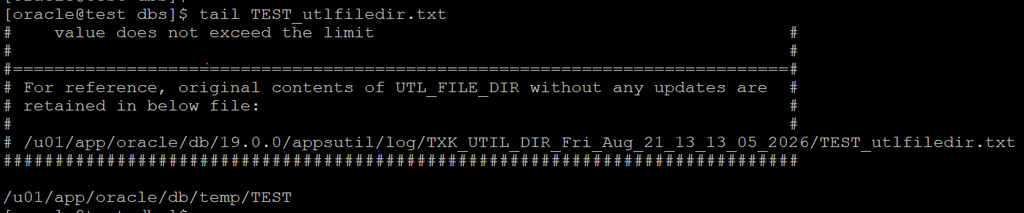
Make directories as per listing directories of TEST_utlfiledir.txt.
[oracle@test dbs]$ mkdir -p /u01/app/oracle/db/temp/TEST- Run the following command to store the updated values for UTL_FILE_DIR in the database:
[oracle@test ~]$ cd $ORACLE_HOME/appsutil/bin

[oracle@test 19.0.0]$ perl $ORACLE_HOME/appsutil/bin/txkCfgUtlfileDir.pl -contextfile=$CONTEXT_FILE -oraclehome=$ORACLE_HOME -outdir=$ORACLE_HOME/appsutil/log -mode=setUtlFileDir
This command will validate the directory paths provided in the <DB_NAME>_utlfiledir.txt for existence and will also create directory objects for all the physical directory paths.
[oracle@test bin]$ perl $ORACLE_HOME/appsutil/bin/txkCfgUtlfileDir.pl -contextfile=$CONTEXT_FILE -oraclehome=$ORACLE_HOME -outdir=$ORACLE_HOME/appsutil/log -mode=setUtlFileDir
Enter the APPS Password:
Script Name    : txkCfgUtlfileDir.pl
Script Version : 120.0.12020000.29
Started        : Fri Aug 21 13:37:02 IST 2026
Log File       : /u01/app/oracle/db/19.0.0/appsutil/log/TXK_UTIL_DIR_Fri_Aug_21_13_36_59_2026/txkCfgUtlfileDir.log
Context file: /u01/app/oracle/db/19.0.0/appsutil/TEST_test.xml exists.
Enter the ebs_system Password:
Completed        : Fri Aug 21 13:37:07 IST 2026
Successfully Completed the script
ERRORCODE = 0 ERRORCODE_END- Run the following command to create the directory object for the outbound directory (pointed to by the s_outbound_dir context variable in the database tier context file).
[oracle@test ~]$ . TEST_test.env
[oracle@test bin]$ grep -i s_outbound_dir $CONTEXT_FILE

	 <OUTBOUND_DIR oa_var="s_outbound_dir">/u01/app/oracle/db/19.0.0/appsutil/outbound/TEST_test</OUTBOUND_DIR>
[oracle@test bin]$ perl $ORACLE_HOME/appsutil/bin/txkCfgUtlfileDir.pl -contextfile=$CONTEXT_FILE -oraclehome=$ORACLE_HOME -outdir=$ORACLE_HOME/appsutil/log -mode=createDirObject
Enter the APPS Password:
Script Name    : txkCfgUtlfileDir.pl
Script Version : 120.0.12020000.29
Started        : Fri Aug 21 13:52:27 IST 2026
Log File       : /u01/app/oracle/db/19.0.0/appsutil/log/TXK_UTIL_DIR_Fri_Aug_21_13_52_25_2026/txkCfgUtlfileDir.log
Context file: /u01/app/oracle/db/19.0.0/appsutil/TEST_test.xml exists.
Enter the ebs_system Password:
Enter the OS path for which directory object needs to be created: /u01/app/oracle/db/19.0.0/appsutil/outbound/TEST_test -- Please pass the value from above grep output
Completed        : Fri Aug 21 13:52:40 IST 2026
Successfully Completed the script
ERRORCODE = 0 ERRORCODE_END- Sync up the value of UTL_FILE_DIR in the database tier context file by running the following command:
[oracle@test ~]$ perl $ORACLE_HOME/appsutil/bin/txkCfgUtlfileDir.pl -contextfile=$CONTEXT_FILE -oraclehome=$ORACLE_HOME -outdir=$ORACLE_HOME/appsutil/log -mode=syncUtlFileDir
Enter the APPS Password:
Script Name    : txkCfgUtlfileDir.pl
Script Version : 120.0.12020000.29
Started        : Fri Aug 21 13:56:33 IST 2026
Log File       : /u01/app/oracle/db/19.0.0/appsutil/log/TXK_UTIL_DIR_Fri_Aug_21_13_56_31_2026/txkCfgUtlfileDir.log
Context file: /u01/app/oracle/db/19.0.0/appsutil/TEST_test.xml exists.
Completed        : Fri Aug 21 13:56:34 IST 2026
Successfully Completed the script
ERRORCODE = 0 ERRORCODE_END- Run the adcfgclone utility to configure the target database.
Note: The dbconfig option will configure the database with the required settings for the new target, Control file will not be created.
[oracle@test bin]$ cd $ORACLE_HOME/appsutil/clone/bin

[oracle@test bin]$ perl adcfgclone.pl dbconfig $CONTEXT_FILEApplication Clone :
Pre-requisite on source application side :
- On application side, source RUN environment and execute preclone command.
[applmgr@test ~]$ . EBSapps.env run
E-Business Suite Environment Information
  ----------------------------------------
  RUN File System           : /u01/app/oracle/apps/fs1/EBSapps/appl
  PATCH File System         : /u01/app/oracle/apps/fs2/EBSapps/appl
  Non-Editioned File System : /u01/app/oracle/apps/fs_ne
[applmgr@test ~]$ adpreclone.pl appsTier- Make a tar of EBSapps directory of RUN file system.
[applmgr@test ~]$ cd $RUN_BASE
[applmgr@test fs1]$ nohup tar -czvf EBSapps_PROD.tgz EBSapps & --Executing command with nohup, will run the task in background- Transfer EBSapps file system backup to your target.
Steps to be performed on Target application side :
1. Make directory structure on target side.
Apps Directory : /u01/app/oracle/apps/
[applmgr@test ~]$ cd /u01/app/oracle/apps/
[applmgr@test apps]$ mkdir fs1 fs2 fs_ne2. Copy source filesystem backup file on target inside fs1 directory and untar it.
[applmgr@test fs1]$ nohup tar -xzvf EBSapps_PROD.tgz &3. Configure filesystem using adcfgclone.pl.
[applmgr@test bin]$ cd /u01/app/oracle/apps/fs1/EBSapps/comn/clone/bin
[applmgr@test bin]$ perl adcfgclone.pl appsTier dualfs
                     Copyright (c) 2002, 2015 Oracle Corporation
                        Redwood Shores, California, USA
                        Oracle E-Business Suite Rapid Clone
                                 Version 12.2
                      adcfgclone Version 120.63.12020000.83
Enter the APPS password :
Enter the Weblogic AdminServer password :
Enter the password for DataSource ISGDatasource :
Do you want to add a node (yes/no) [no] :
Running: Context clone...
Log file located at /u01/app/oracle/apps/fs1/EBSapps/comn/clone/bin/CloneContext_0821141547.log
Provide the values required for creation of the new APPL_TOP Context file.
Target System Hostname (virtual or normal) [test] : test.example.com
Target System Database SID : TEST
Target System Database Server Node [test] : test.example.com
Target System Base Directory : /u01/app/oracle/apps
Target System Base Directory set to /u01/app/oracle/apps
Target System Current File System Base set to /u01/app/oracle/apps/fs1
Target System Other File System Base set to /u01/app/oracle/apps/fs2
Target System Fusion Middleware Home set to /u01/app/oracle/apps/fs1/FMW_Home
Target System Other File System Fusion Middleware Home set to /u01/app/oracle/apps/fs2/FMW_Home
Target System Web Oracle Home set to /u01/app/oracle/apps/fs1/FMW_Home/webtier
Target System Other File System Web Oracle Home set to /u01/app/oracle/apps/fs2/FMW_Home/webtier
Target System Appl TOP set to /u01/app/oracle/apps/fs1/EBSapps/appl
Target System Other File System Appl TOP set to /u01/app/oracle/apps/fs2/EBSapps/appl
Target System COMMON TOP set to /u01/app/oracle/apps/fs1/EBSapps/comn
Target System Other File System COMMON TOP set to /u01/app/oracle/apps/fs2/EBSapps/comn
Target System Instance Home Directory [/u01/app/oracle/apps] :
Target System Current File System Instance Top set to /u01/app/oracle/apps/fs1/inst/apps/TEST_test
Do you want to preserve the Display [localhost:5.0] (y/n)  : n
Target System Display [test:0.0] :
Target System Root Service [enabled] :
Target System Web Entry Point Services [enabled] :
Target System Web Application Services [enabled] :
Target System Batch Processing Services [enabled] :
Target System Other Services [disabled] :
Do you want the target system to have the same port values as the source system (y/n) [y] ? : n
Target System Port Pool [0-99] : 0
Checking the port pool 0
done: Port Pool 0 is free
Report file located at /u01/app/oracle/apps/fs1/inst/apps/TEST_test/admin/out/portpool.lst
Target System proxy port [80] :
EBS_APPLPTMP consists of below directory.
1. /u01/app/oracle/db/temp/TEST
Choose a value which will be set as APPLPTMP on the target node [1] :
The new APPL_TOP context file has been created :
  /u01/app/oracle/apps/fs1/inst/apps/TEST_test/appl/admin/TEST_test.xml
Check Clone Context logfile /u01/app/oracle/apps/fs1/EBSapps/comn/clone/bin/CloneContext_0821141547.log for details.
Creating Patch file system context file.....
Log file located at /u01/app/oracle/apps/fs1/EBSapps/comn/clone/bin/CloneContextPatch_0821141743.log
Target System Other File System Instance Top set to /u01/app/oracle/apps/fs2/inst/apps/TEST_test
Target System Port Pool [0-99] : 1
Checking the port pool 1
done: Port Pool 1 is free
Report file located at /u01/app/oracle/apps/fs2/inst/apps/TEST_test/admin/out/portpool.lst
The new APPL_TOP context file has been created :
  /u01/app/oracle/apps/fs2/inst/apps/TEST_test/appl/admin/TEST_test.xml
Check Clone Context logfile /u01/app/oracle/apps/fs1/EBSapps/comn/clone/bin/CloneContextPatch_0821141743.log for details.
FMW Pre-requisite check log file location : /u01/app/oracle/apps/fs1/EBSapps/comn/clone/FMW/logs/prereqcheck.log
Running: FMW pre-req check...
Configuring: Run file system....
LogFile located at /u01/app/oracle/apps/fs1/inst/apps/TEST_test/admin/log/clone/run/RCloneApplyAppstier_08211418.log
<Aug 21, 2026 2:36:19 PM IST> <Warning> <JNDI> <BEA-050001> <WLContext.close() was called in a different thread than the one in which it was created.>
Configuring: Patch file system....
LogFile located at /u01/app/oracle/apps/fs1/inst/apps/TEST_test/admin/log/clone/patch/RCloneApplyAppstier_08211441.log
Do you want to startup the Application Services for TEST? (y/n) [n] :
Services not startedadcfgclone.pl has been completed successfully.
4. Load run filesystem and start the services.
[applmgr@test ~]$ . EBSapps.env run
  E-Business Suite Environment Information
  ----------------------------------------
  RUN File System           : /u01/app/oracle/apps/fs2/EBSapps/appl
  PATCH File System         : /u01/app/oracle/apps/fs1/EBSapps/appl
  Non-Editioned File System : /u01/app/oracle/apps/fs_ne
  DB Host: test.example.com  Service/SID: TEST
  Sourcing the RUN File System ...
[applmgr@test ~]$ adstrtal.shPlease complete EBS post cloning steps according to your environment.
As a standard practice, below steps being performed in cloned environment. However, it can be vary as per your environment.
- Change Apps Password and update Weblogic configuration with new password.
- Change Java Colour theme for EBS front end different than live system.
System Administrator -> Profile -> System
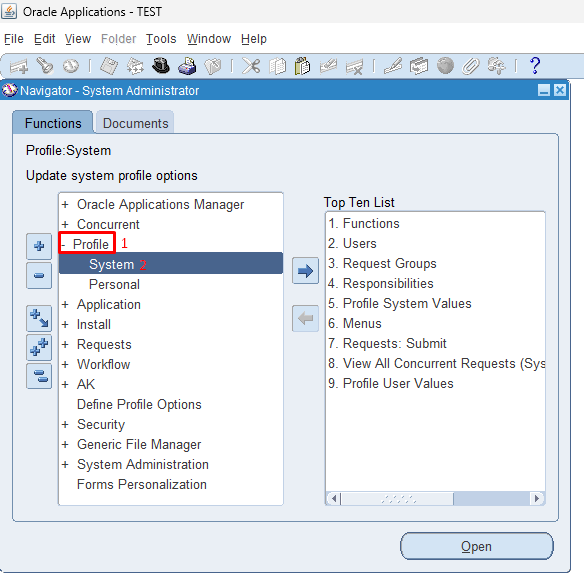
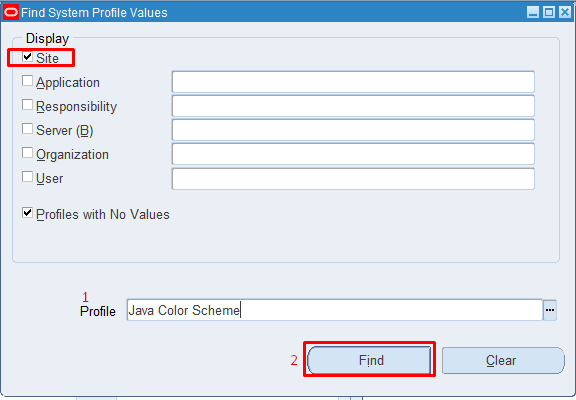
Select Site, Enter Java Color Scheme in search and click on Find.
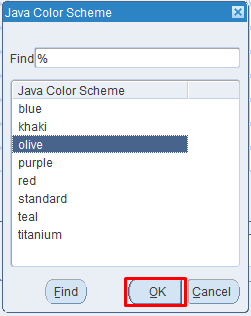
Select colour scheme which is different than Production and Click OK. Press Ctrl + S to save your work. Relaunch Front-end to verify the change.
- Update all Workflow email to Sent.
SQL> UPDATE wf_notifications SET mail_status = 'MAIL';- Change SYSADMIN password.
[applmgr@test ~]$ FNDCPASS apps/<password> 0 Y system/<password> USER sysadmin <password>- Schedule “Gather Schema Statistic” concurrent program as per the schedule.
- Configure Workflow if applicable in your environment.
Disclaimer:
This is an independent personal blog and is not affiliated with, sponsored by, or endorsed by Oracle Corporation. The views, explanations, and experiences expressed here are the author’s own. Commands, scripts, and procedures may be based on Oracle’s official documentation and are provided for educational and reference purposes only. Always test and validate them before use in a Live/Production environment. Sample output shown in this article was generated during the author’s own testing and may vary depending on the environment.
Please read full Disclaimer.